
Biaxial Stepper Motor
A specialized concentric stepper motor that can independently drive two concentric shafts (like the hour and minute hands of a clock).
Component Preview
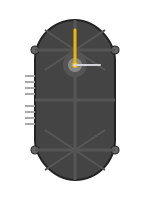 Biaxial Stepper
This is a 2-in-1 motor commonly found in automotive dashboards and sophisticated analog clocks. It consists of two independent stepper motors mechanically geared to drive an outer tubular shaft and an inner solid shaft on exactly the same axis.
Overview
Because this component contains two independent stepper motors, it requires two independent motor drivers (like two A4988 modules) or a multi-channel driver board. It is perfect for creating analog dials that display two different metrics simultaneously.
Pin Reference
| Pin | Type | Description |
|---|---|---|
| A1-, A1+ | analog | Coil A for Motor 1 (Inner Shaft). |
| B1-, B1+ | analog | Coil B for Motor 1 (Inner Shaft). |
| A2-, A2+ | analog | Coil A for Motor 2 (Outer Shaft). |
| B2-, B2+ | analog | Coil B for Motor 2 (Outer Shaft). |
Configurable Attributes
| Attribute | Type | Default | Description |
|---|---|---|---|
| outerHandLength | number | 30 | Visual length of the outer shaft's pointer in the simulator. |
| outerHandColor | string | "gold" | Color of the outer shaft's pointer. |
| outerHandShape | string | "plain" | Shape style of the outer shaft's pointer. |
| innerHandLength | number | 30 | Visual length of the inner shaft's pointer in the simulator. |
| innerHandColor | string | "silver" | Color of the inner shaft's pointer. |
| innerHandShape | string | "plain" | Shape style of the inner shaft's pointer. |
| step_angle | number | 1.8 | Degrees rotated per full step (usually 1.8 for standard 200-step motors). |
Working Principle
Each of the two motors functions exactly like a standard bipolar stepper motor. By pulsing Coil A and Coil B in the correct sequence, the rotor turns. The mechanical housing aligns the rotors so that their output shafts are perfectly concentric.
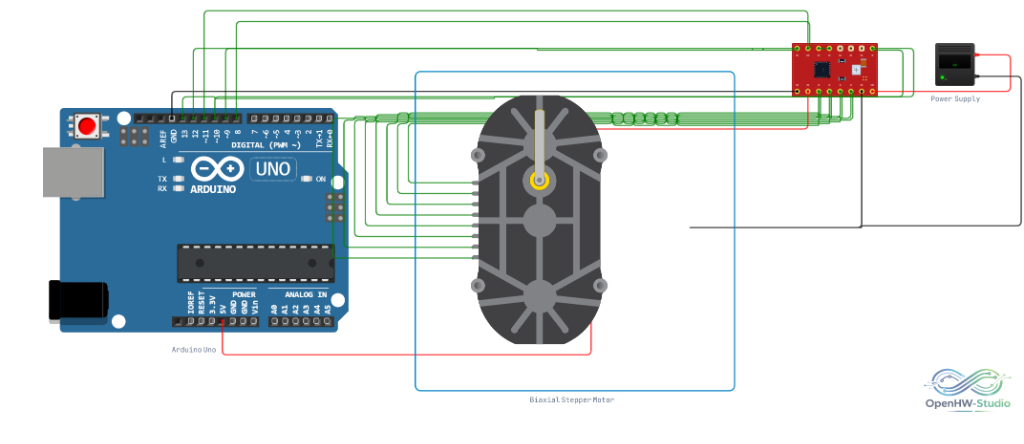
Wiring Diagram
You will need two A4988 (or similar) Stepper Drivers to run this motor. Connect each driver to one of the motor's coils.
Example Arduino Code
This example requires the AccelStepper library and assumes you are using two A4988 drivers.
#include <AccelStepper.h>

const int innerStep = 2;
const int innerDir = 3;
const int outerStep = 4;
const int outerDir = 5;

// Define steppers and the pins they will use
AccelStepper stepperInner(AccelStepper::DRIVER, innerStep, innerDir);
AccelStepper stepperOuter(AccelStepper::DRIVER, outerStep, outerDir);

void setup() {
  stepperInner.setMaxSpeed(1000);
  stepperInner.setAcceleration(500);

  stepperOuter.setMaxSpeed(1000);
  stepperOuter.setAcceleration(500);
}

void loop() {
  // Move Inner pointer clockwise
  if (stepperInner.distanceToGo() == 0) {
    stepperInner.moveTo(stepperInner.currentPosition() + 200);
  }

  // Move Outer pointer counter-clockwise
  if (stepperOuter.distanceToGo() == 0) {
    stepperOuter.moveTo(stepperOuter.currentPosition() - 200);
  }

  stepperInner.run();
  stepperOuter.run();
}
Simulation Notes
- The simulator visually renders two hands (pointers) extending from the center of the motor. You can customize their colors and lengths via the component attributes to easily tell them apart.
- The motors operate independently; running one will not mechanically interfere with the other.