
Power Supply
Provides a stable regulated DC voltage to the circuit with a configurable output (3.3V, 5V, or custom).
Component Preview
 Bench Power Supply
A standalone regulated DC power supply component. Use it to power components (sensors, displays, motors) that need a dedicated voltage rail independent of the Arduino. The output voltage is configurable via the component attributes.
Overview
A dedicated power supply is necessary when simulating components that draw more current than the Arduino can safely provide (such as motors and relays), or components that require a different voltage level (like 12V or 3.3V).
Typical Use Cases
- 3.3V: ESP-series modules, modern sensors, logic level translation.
- 5.0V: Servo motors, NeoPixels, relay modules, most Arduino shields.
- 12.0V: DC motors, solenoids, LED strips (non-addressable).
CAUTION
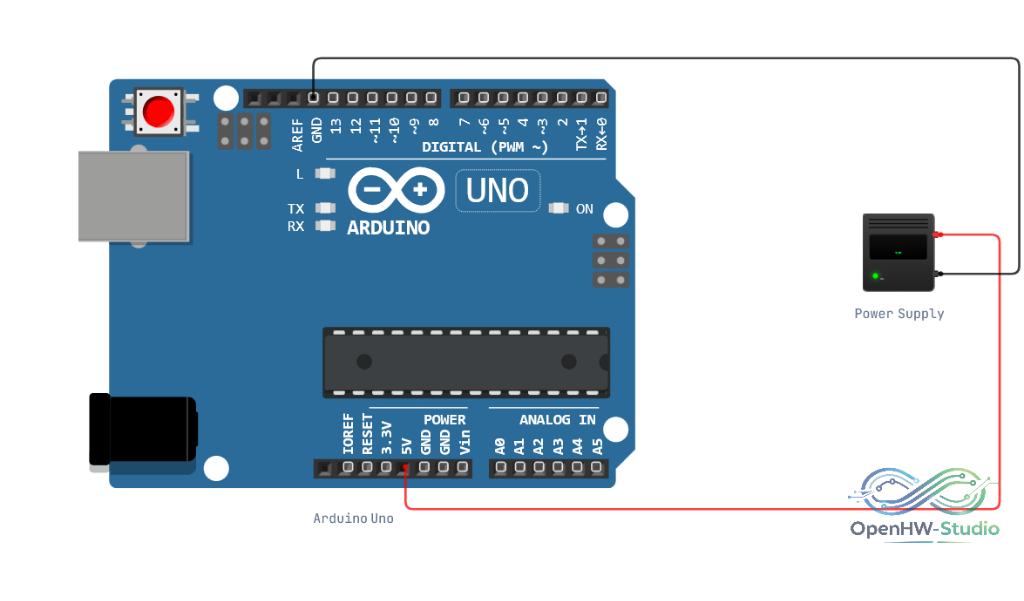
Common Ground: Always share a common GND between the Power Supply and the Arduino. If they do not share the same ground potential, the circuit signals will be meaningless and the circuit will behave unpredictably.
Pin Reference
| Pin | Type | Description |
|---|---|---|
| 5V | power | Positive voltage output (configurable value, despite the "5V" name). |
| GND | power | Ground reference. |
Configurable Attributes
| Attribute | Type | Default | Description |
|---|---|---|---|
| voltage | number | 5.0 | The output voltage of the supply (e.g., 3.3, 5, 12). |
Wiring Diagram
Example of connecting the Power Supply to share a common ground with an Arduino Uno while independently powering an external circuit.
Example Arduino Code
A power supply does not require code to function, as it is a passive power source. Your code must simply account for the fact that external components are powered independently.
void setup() {
  // A standalone power supply requires no Arduino initialization.
  Serial.begin(9600);
  Serial.println("Circuit powered up.");
}

void loop() {
  // External components powered by this supply can be controlled normally.
}
Simulation Notes
- In the simulator, the text display on the component will update to reflect the
voltageattribute you set indiagram.json.