
Pushbutton (6mm)
A classic, normally-open momentary tactile switch used for user input.
Component Preview
 Tact Switch
The standard 6x6mm tactile switch is a momentary button. When pressed, it completes the circuit between its pins. When released, the connection is broken. It is essential for creating user interfaces, resets, and simple triggers.
Overview
This button has 4 pins, but internally they are connected in pairs. Pins 1A and 1B are permanently connected to each other, as are pins 2A and 2B. Pressing the button bridges the gap between the '1' side and the '2' side. To avoid "floating" logic states, always use a pull-up or pull-down resistor (or use Arduino's internal INPUT_PULLUP).
Pin Reference
| Pin | Type | Description |
|---|---|---|
| 1A | passive | Terminal 1A (connected to 1B). |
| 1B | passive | Terminal 1B (connected to 1A). |
| 2A | passive | Terminal 2A (connected to 2B). |
| 2B | passive | Terminal 2B (connected to 2A). |
Configurable Attributes
| Attribute | Type | Default | Description |
|---|---|---|---|
| color | string | blue | Visual button cap color (e.g., `blue`, `red`, `green`, `yellow`, `white`, `black`, `orange`). |
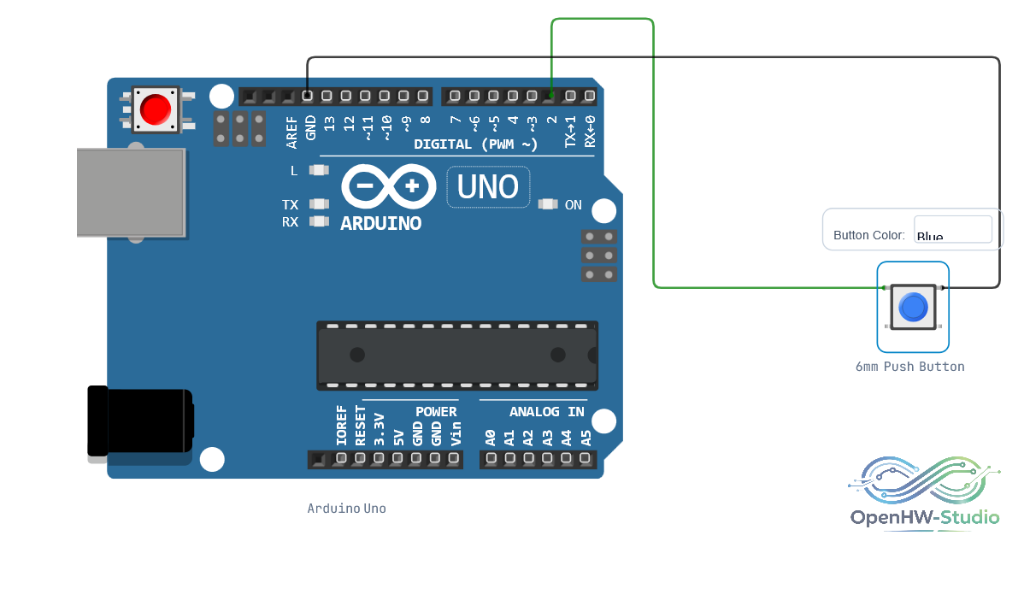
Wiring Diagram
Example of connecting the Pushbutton (6mm) to an Arduino Uno using the internal pull-up resistor.
Example Arduino Code
This code uses the INPUT_PULLUP mode, meaning the button will read HIGH normally, and LOW when pressed.
const int buttonPin = 2;

void setup() {
  Serial.begin(9600);
  // Enable the internal pull-up resistor
  pinMode(buttonPin, INPUT_PULLUP);
}

void loop() {
  // Read the button state
  int buttonState = digitalRead(buttonPin);

  // Check if button is pressed (it will be LOW due to INPUT_PULLUP)
  if (buttonState == LOW) {
    Serial.println("Button is PRESSED!");
  } else {
    Serial.println("Button is RELEASED.");
  }

  // Add a small delay to debounce
  delay(100);
}
Simulation Notes
- In the OpenHW Simulator, you can simply click the button on the breadboard to simulate a press. It acts as a momentary switch (it releases when you let go of the mouse).