
Slide Switch
A mechanical switch with a sliding actuator that connects the common terminal to one of two other terminals.
Component Preview
 Slide Switch
A slide switch physically connects its middle pin to either the left pin or the right pin, depending on the position of the slider. It is typically used for power switches, configuration toggles, or mode selection in projects.
SensorsSwitchMechanical
Overview
Unlike a momentary pushbutton which only stays connected while you press it, a slide switch is a "latching" switch. It remains in its current state until physically moved. This makes it perfect for persistent states (like ON / OFF).
Pin Reference
| Pin | Type | Description |
|---|---|---|
| 1 | passive | Left terminal. |
| 2 | passive | Common terminal (Middle). |
| 3 | passive | Right terminal. |
Configurable Attributes
| Attribute | Type | Default | Description |
|---|---|---|---|
| value | boolean | false | Initial state of the switch (false = left, true = right). |
| bounce | number | 0 | Simulated mechanical contact bounce time in milliseconds. |
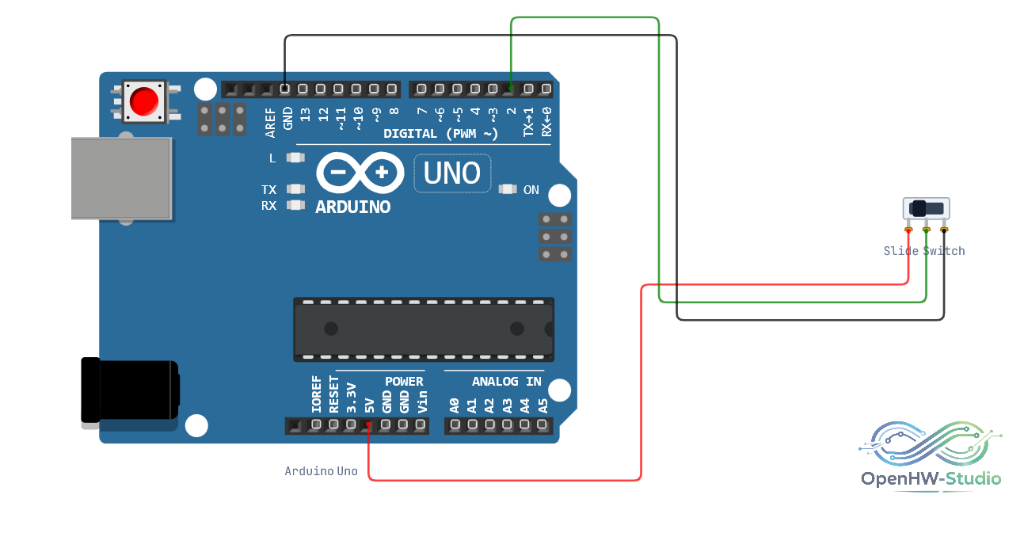
Wiring Diagram
Example of connecting the Slide Switch to an Arduino Uno.
Example Arduino Code
This code reads the state of the slide switch and turns the built-in LED (Pin 13) on or off accordingly.
cpp
const int switchPin = 3;
const int ledPin = 13;
bool lastSwitchState = false;

void setup() {
  Serial.begin(9600);
  pinMode(switchPin, INPUT); // Switch handles its own VCC/GND
  pinMode(ledPin, OUTPUT);
  Serial.println("Slide Switch Ready");
}

void loop() {
  bool currentSwitchState = digitalRead(switchPin);

  if (currentSwitchState != lastSwitchState) {
    Serial.print("Switch is now: ");
    if (currentSwitchState == HIGH) {
      Serial.println("ON");
      digitalWrite(ledPin, HIGH);
    } else {
      Serial.println("OFF");
      digitalWrite(ledPin, LOW);
    }
    lastSwitchState = currentSwitchState;
  }

  delay(50); // Small delay to handle debounce
}
Simulation Notes
- Click the switch slider in the simulation to toggle its position.
- You can add mechanical bounce using the
bounceattribute indiagram.jsonto test your software debouncing routines!