
NeoPixel Ring
A stunning circular display of fully addressable WS2812B RGB LEDs, perfect for clocks, dials, and radial animations.
Component Preview
 NeoPixel Ring
Similar to the NeoPixel matrix, the NeoPixel Ring consists of daisy-chained WS2812B LEDs arranged in a circle. You only need a single microcontroller pin to control the color and brightness of every single LED in the ring.
DisplaysRGBRadial
Overview
NeoPixel rings come in various sizes (e.g., 12, 16, 24 pixels). The OpenHW Simulator defaults to a 16-pixel ring. Because the LEDs are in a circle, you can easily create spinner animations, loading dials, or clock faces using simple math in your Arduino code.
Pin Reference
| Pin | Type | Description |
|---|---|---|
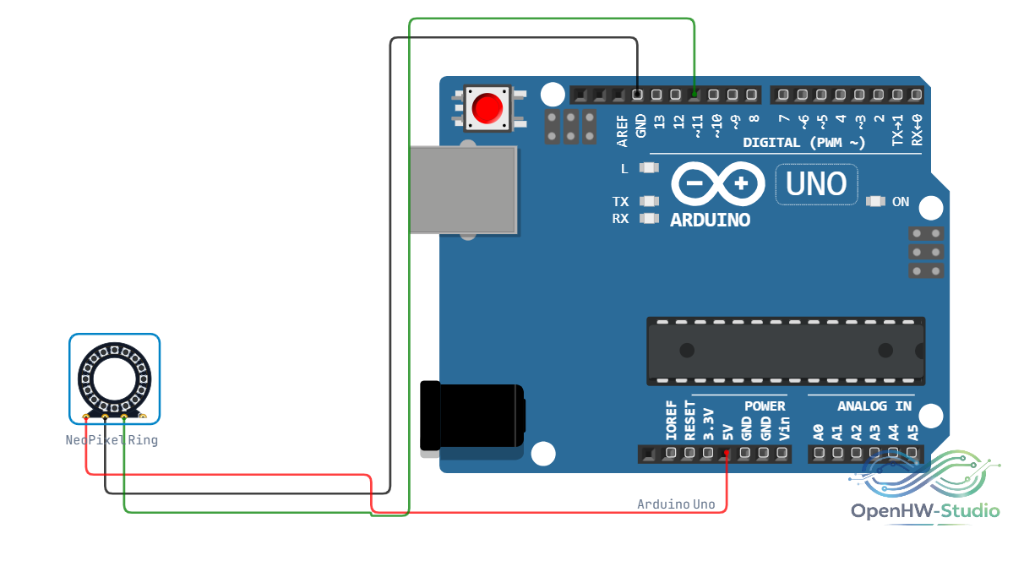
| VCC | power | 5V Power Supply. |
| GND | power | Ground. Connect to Arduino GND. |
| DIN | digital | Data In. Connect to a digital pin on the Arduino. |
| DOUT | digital | Data Out. Used to chain to another NeoPixel ring or strip. |
Configurable Attributes
| Attribute | Type | Default | Description |
|---|---|---|---|
| pixels | number | 16 | The number of LEDs in the ring. Note: Extremely large numbers may render awkwardly in the simulator. |
Wiring Diagram
Example Arduino Code
Install the FastLED library from the Library Manager. This code creates a chasing rainbow effect around the ring.
cpp
#include <FastLED.h>

#define DATA_PIN    6
#define NUM_LEDS    16

CRGB leds[NUM_LEDS];
uint8_t hue = 0; // Global hue value

void setup() {
  FastLED.addLeds<WS2812B, DATA_PIN, GRB>(leds, NUM_LEDS);
  FastLED.setBrightness(50);
}

void loop() {
  // Fill the ring with a rainbow gradient
  fill_rainbow(leds, NUM_LEDS, hue, 255 / NUM_LEDS);

  FastLED.show();

  // Slowly shift the starting hue
  hue++;

  delay(20); // Control the speed of rotation
}
Simulation Notes
- The physical layout in the simulator dynamically scales based on the
pixelsattribute. Rings larger than 60 pixels may clip outside standard breadboard bounds.