
HX711 Load Cell (5kg)
A high-precision 24-bit analog-to-digital converter designed specifically for weigh scales and industrial control applications.
Component Preview
This module consists of a physical aluminum load cell (strain gauge) capable of measuring up to 5kg, pre-wired to an HX711 amplifier breakout board. The amplifier translates the microscopic analog voltage changes into a digital signal.
Overview
A load cell is essentially a metal bar with strain gauges glued to it. When weight is applied, the bar bends slightly, changing the electrical resistance of the gauges. Because this change is incredibly small, the HX711 chip amplifies the signal and converts it to a 24-bit digital value.
Pin Reference
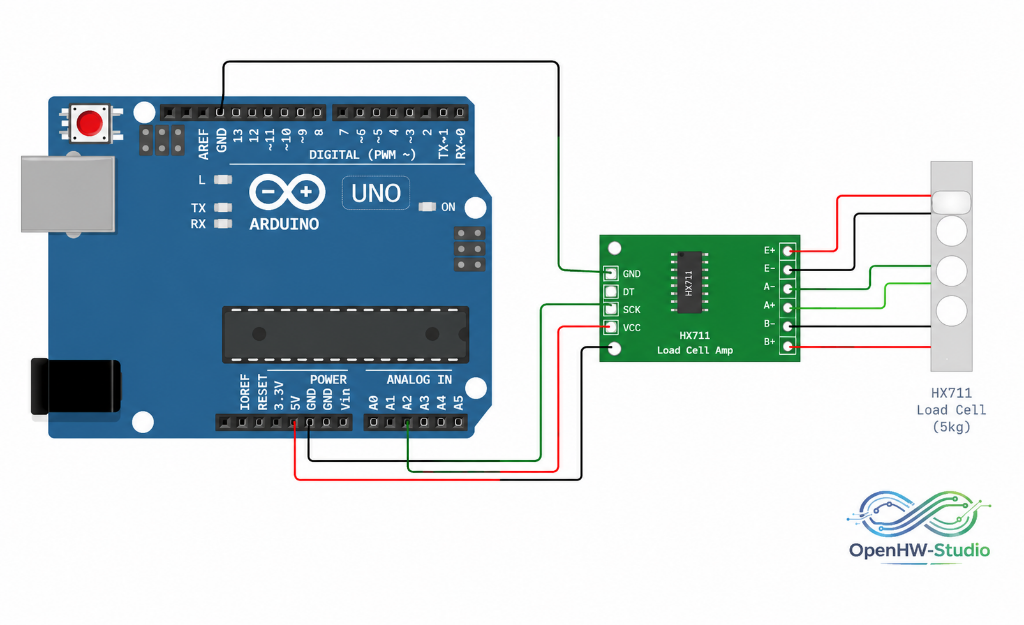
(Note: These are the pins connecting the HX711 board to the Arduino. The 4 wires connecting the load cell to the HX711 are internally managed).
| Pin | Type | Description |
|---|---|---|
| VCC | power | Power supply (2.7V to 5.5V). |
| DT | digital | Data Output. Connect to any digital pin. |
| SCK | digital | Clock Input. Connect to any digital pin. |
| GND | power | Ground. |
Configurable Attributes
| Attribute | Type | Default | Description |
|---|---|---|---|
| load | number | 0 | The simulated weight (load) applied to the cell, usually in grams. Adjustable via the UI slider during simulation. |
Working Principle
The HX711 does not use I2C or SPI; it uses a custom two-wire protocol. The Arduino pulses the SCK pin to read the 24 bits of data out of the DT pin one by one. The number of clock pulses also dictates the gain (amplification) used for the next reading.
Wiring Diagram
Example of connecting the HX711 Load Cell to an Arduino Uno.
Example Arduino Code
Install the HX711 by bodge library via the Library Manager before running.
#include "HX711.h"

// HX711 circuit wiring
const int LOADCELL_DOUT_PIN = 3;
const int LOADCELL_SCK_PIN = 2;

HX711 scale;

void setup() {
  Serial.begin(9600);
  Serial.println("HX711 Demo");

  scale.begin(LOADCELL_DOUT_PIN, LOADCELL_SCK_PIN);

  // You must calibrate your scale!
  // Set this to the value obtained from a calibration sketch.
  scale.set_scale(420.0983);

  // Reset the scale to 0 (tare)
  scale.tare();
}

void loop() {
  if (scale.is_ready()) {
    // Read the weight (in units dictated by set_scale)
    float weight = scale.get_units(5);

    Serial.print("Weight: ");
    Serial.print(weight, 1);
    Serial.println(" g");
  } else {
    Serial.println("HX711 not found.");
  }

  delay(1000);
}
Simulation Notes
- You can dynamically adjust the weight on the load cell during simulation by clicking it and using the slider popup.
- The simulator provides raw ADC values directly proportional to the slider value.