
NeoPixel Matrix
A fully addressable 8x8 WS2812B RGB LED matrix capable of vibrant animations and colorful text using just one data pin.
Component Preview
 RGB Matrix
A standard 8x8 matrix of WS2812B "NeoPixel" LEDs. Each of the 64 pixels can be set to any 24-bit color independently. The pixels are daisy-chained internally, meaning the microcontroller only needs one digital output pin to control the entire display.
Overview
NeoPixels (WS2812B LEDs) contain a tiny integrated circuit inside each LED package. The first LED takes the first 24 bits of color data from the data stream and passes the rest down the line. Because of the strict timing requirements, a library like FastLED or Adafruit_NeoPixel is necessary to drive them.
WARNING
Power Constraints: 64 LEDs at full white brightness can draw over 3 Amps of current. Do NOT power a full matrix directly from the Arduino's 5V pin in real life; use a dedicated 5V power supply. The simulator handles this automatically.
Pin Reference
| Pin | Type | Description |
|---|---|---|
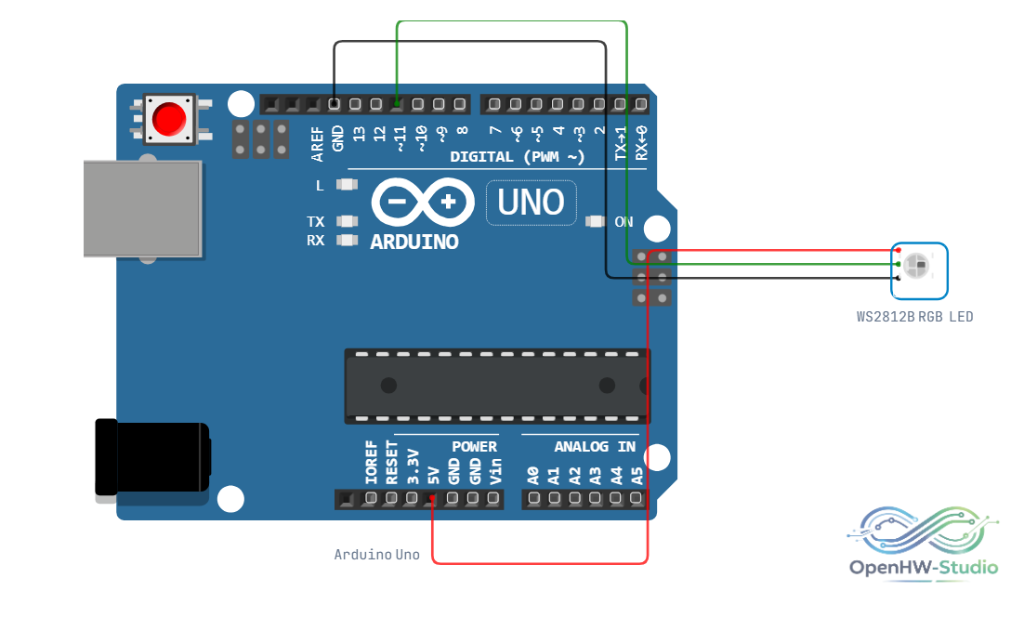
| VCC | power | 5V Power Supply. |
| GND | power | Ground. Connect to Arduino GND. |
| DIN | digital | Data In. Connect to a digital pin on the Arduino (e.g., D6). |
| DOUT | digital | Data Out. Used to chain another matrix or NeoPixel strip. |
Configurable Attributes
| Attribute | Type | Default | Description |
|---|---|---|---|
| rows | number | 1 | Multiplier for matrix layout in the simulator (number of 8x8 blocks vertically). |
| cols | number | 1 | Multiplier for matrix layout in the simulator (number of 8x8 blocks horizontally). |
Wiring Diagram
Example Arduino Code
Install the FastLED library from the Library Manager to run this code. It fills the matrix with blue, then black.
#include <FastLED.h>

// Define the data pin and number of LEDs in the matrix (8x8 = 64)
#define DATA_PIN    6
#define NUM_LEDS    64

// Create an array to hold the color data for each pixel
CRGB leds[NUM_LEDS];

void setup() {
  // Initialize the FastLED library
  FastLED.addLeds<WS2812B, DATA_PIN, GRB>(leds, NUM_LEDS);

  // Limit brightness for safety/power reasons (0-255)
  FastLED.setBrightness(50);
}

void loop() {
  // Fill the entire matrix with solid blue
  fill_solid(leds, NUM_LEDS, CRGB::Blue);
  FastLED.show();
  delay(500);

  // Turn off all LEDs
  fill_solid(leds, NUM_LEDS, CRGB::Black);
  FastLED.show();
  delay(500);
}
Simulation Notes
- The simulator performs well with matrices up to roughly 256 LEDs. Beyond that, the frame rate may drop depending on your computer's processing power.