
Resistor
A fundamental passive component that limits electrical current flow and acts to divide voltages.
Component Preview
 Resistor (220Ω)
A resistor is a passive two-terminal component that opposes electrical current. It is described by Ohm's Law (V = I × R). It is essential for protecting sensitive components like LEDs from receiving too much current, and for pulling digital lines high or low to prevent floating states.
Overview
Resistors are the most common component in electronic circuits. They are non-polarized, meaning you can plug them in in either direction.
Common Values
- 220 Ω or 330 Ω: Current-limiting for a standard 5V LED (≈10-15 mA).
- 1 kΩ: Pull-up / pull-down for some digital inputs, base resistors for transistors.
- 10 kΩ: Standard high-impedance pull-up for buttons, I2C lines, and sensors.
LED Current-Limiting Formula
To calculate the ideal resistor for an LED, use Ohm's Law: R = (Vsupply - Vforward) / I_desired
Example (Red LED at 5V, wanting 20 mA):R = (5V - 2V) / 0.02A = 150 Ω → use 220 Ω (next standard value)
Pin Reference
| Pin | Type | Description |
|---|---|---|
| p1 | passive | Terminal 1 (Polarity independent). |
| p2 | passive | Terminal 2 (Polarity independent). |
Configurable Attributes
| Attribute | Type | Default | Description |
|---|---|---|---|
| value | string | "220" | Resistance value in Ohms (e.g., "1k" or "10k" can also be used depending on simulator support). |
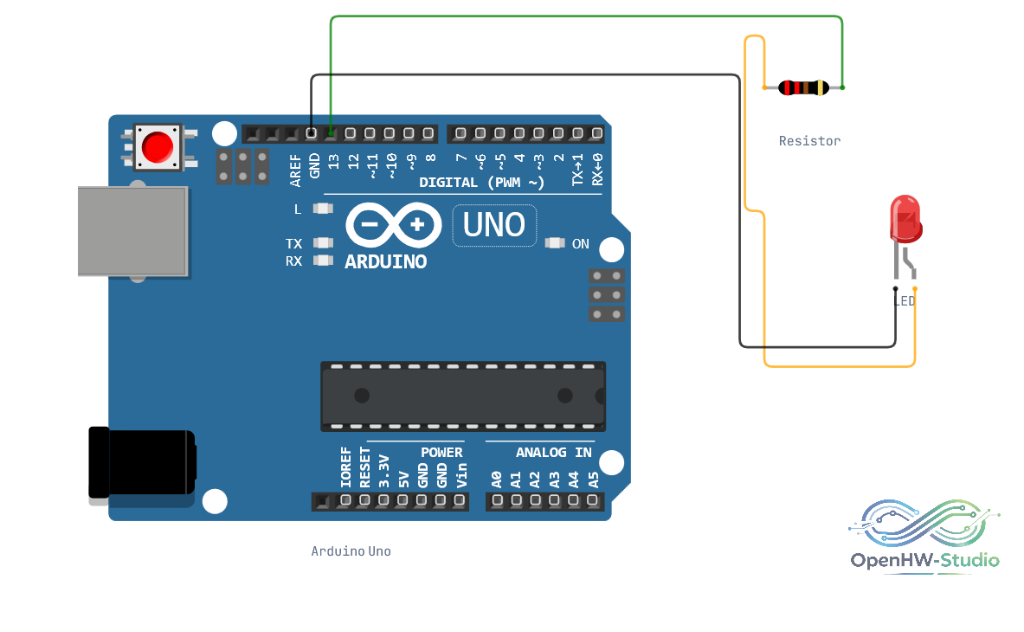
Wiring Diagram
Example of connecting a Resistor in series to limit current for an LED.
Example Arduino Code
Because a resistor is a passive physical component, it requires no specific code. It works entirely within the hardware domain.
void setup() {
  // A resistor requires no code initialization.
}

void loop() {
  // The resistor limits current passively in the background.
}
Simulation Notes
- In OpenHW Studio, right-click the resistor on the canvas during simulation to open the context menu and change the resistance value in real time. The color bands on the resistor graphic will update automatically!