
Capacitive Soil Moisture Sensor
An analog sensor that measures the dielectric constant of the surrounding soil to determine its moisture content.
Component Preview
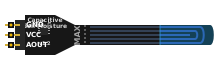 Capacitive Sensor
Unlike resistive sensors that are prone to corrosion, a capacitive soil moisture sensor uses capacitance changes to measure water content. It has no exposed metal on the probe itself, making it highly durable for long-term plant monitoring and automated irrigation systems.
Overview
The sensor outputs an analog voltage on its AOUT pin. As the moisture level in the soil increases, the capacitance of the sensor increases, which typically results in a lower voltage output. Conversely, dry soil results in a higher voltage output.
Pin Reference
| Pin | Type | Description |
|---|---|---|
| GND | power | Ground connection. Connect to Arduino GND. |
| VCC | power | Power input. Supports 3.3V to 5V. |
| AOUT | analog | Analog output voltage. Connect to an analog pin (e.g., A0). |
Configurable Attributes
| Attribute | Type | Default | Description |
|---|---|---|---|
| moisture | number | 50 | The simulated soil moisture percentage (0 = completely dry, 100 = completely submerged). |
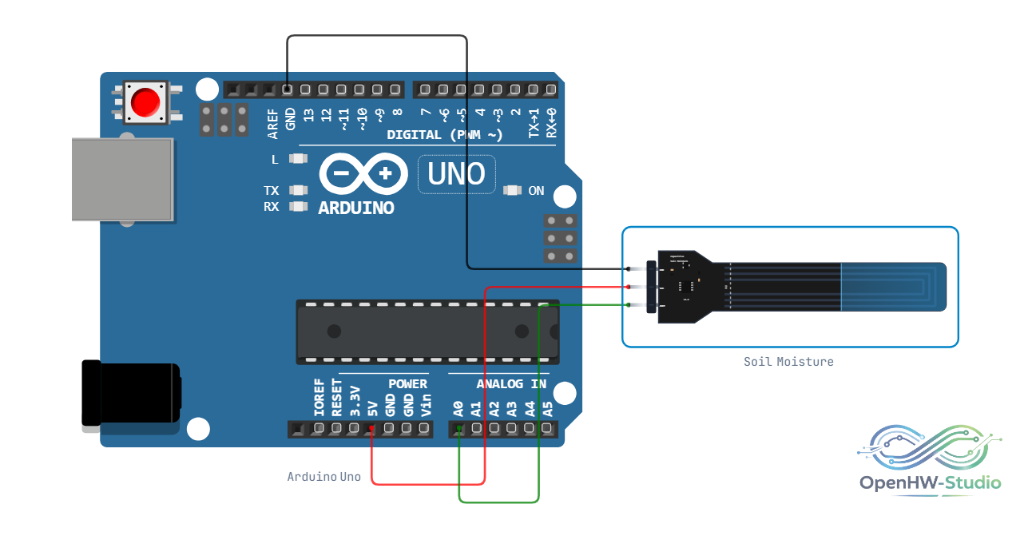
Wiring Diagram (Arduino Uno)
- Connect VCC to Arduino 5V.
- Connect GND to Arduino GND.
- Connect AOUT to Arduino A0.
Example Arduino Code
This sketch reads the analog value and maps it to a human-readable 0-100% moisture scale. Note that the raw values for "dry" and "wet" might need calibration based on your specific sensor module in real life.
const int sensorPin = A0;

// Calibration values (you may need to tweak these for your physical sensor)
const int dryValue = 850;  // Value in completely dry air/soil
const int wetValue = 400;  // Value when fully submerged in water

void setup() {
  Serial.begin(9600);
}

void loop() {
  int rawValue = analogRead(sensorPin);

  // Constrain the value just in case it drifts outside our calibration limits
  int clampedValue = constrain(rawValue, wetValue, dryValue);

  // Map the raw value to a percentage (inverted, because lower value = wetter)
  int moisturePercent = map(clampedValue, dryValue, wetValue, 0, 100);

  Serial.print("Raw: ");
  Serial.print(rawValue);
  Serial.print("  |  Moisture: ");
  Serial.print(moisturePercent);
  Serial.println("%");

  delay(1000);
}
Simulation Notes
- In the simulator, a visual blue overlay on the probe head indicates the current moisture level setting.
- You can right-click the component and use the slider in the context menu to adjust the simulated moisture level from 0% (Dry) to 100% (Submerged).
- As the moisture increases, the output voltage on the
AOUTpin decreases.