
DS18B20 Temperature Sensor
A highly precise digital thermometer that communicates over a single data wire using the 1-Wire protocol.
Component Preview
 TO-92 Package
The DS18B20 uses the 1-Wire protocol, meaning multiple sensors can share exactly the same data pin on your microcontroller. Each sensor has a unique 64-bit serial code burned in at the factory, allowing the master to address them individually.
Overview
Unlike analog thermistors, the DS18B20 provides digital temperature readings with up to 12 bits of resolution (accurate to ±0.5°C). It is extremely common in waterproof probes for measuring liquid temperature.
Pin Reference
| Pin | Type | Description |
|---|---|---|
| GND | power | Ground. Connect to Arduino GND. |
| DQ | digital | 1-Wire data line. Connect to any Arduino digital pin. Requires a 4.7kΩ pull-up resistor to VCC. |
| VCC | power | Power supply. Connect to Arduino 5V or 3.3V. |
WARNING
A 4.7kΩ pull-up resistor between DQ and VCC is required for reliable 1-Wire communication. Without it, readings will fail or be incorrect.
Configurable Attributes
| Attribute | Type | Default | Description |
|---|---|---|---|
| temperature | number | 25 | Initial temperature in °C. Range: −55 to +125. Can be changed live during simulation via the context menu. |
| resolution | number | 12 | Sensor resolution bits. Options: 9, 10, 11, 12. |
Working Principle
The Arduino pulls the DQ line LOW for at least 480µs to reset all devices on the bus, then releases it. It then sends 0xCC (Skip ROM) to address all sensors, or 0x55 followed by a 64-bit address to target a specific sensor. It sends 0x44 (Convert T) to trigger a measurement, and then reads the scratchpad.
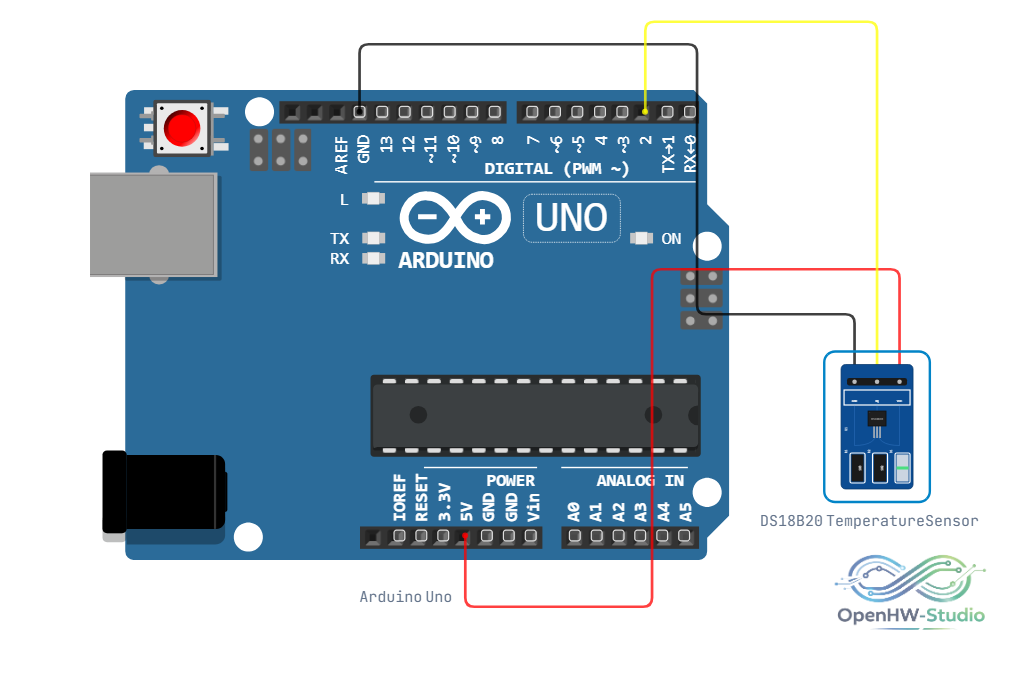
Wiring Diagram
- Connect VCC to 5V.
- Connect GND to Ground.
- Connect DQ to a digital pin (e.g., D2).
- Place a 4.7kΩ Resistor connecting DQ and VCC.
Example Arduino Code
Install the OneWire and DallasTemperature libraries via the Library Manager before running.
#include <OneWire.h>
#include <DallasTemperature.h>

// DS18B20 DQ pin connected to Arduino pin 2
OneWire oneWire(2);
DallasTemperature sensors(&oneWire);

void setup() {
  Serial.begin(9600);
  sensors.begin();
  Serial.println("DS18B20 Ready");
}

void loop() {
  sensors.requestTemperatures();

  float tempC = sensors.getTempCByIndex(0);
  float tempF = sensors.getTempFByIndex(0);

  Serial.print("Temperature: ");
  Serial.print(tempC);
  Serial.print(" °C  /  ");
  Serial.print(tempF);
  Serial.println(" °F");

  delay(1000);
}
Simulation Notes
- In OpenHW Studio, the DS18B20 is simulated at the library abstraction level. The DallasTemperature library calls are intercepted and the simulated temperature value is returned directly — making simulation fast and accurate without bit-level 1-Wire timing overhead.
- Features like Parasite Power Mode and Alarm functions are not currently simulated.