
Relay Module
An electrically controlled mechanical switch that allows an Arduino to safely control high-power loads like motors and lights.
Component Preview
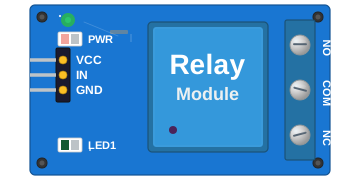 5V Relay
The relay module acts as an electrically controlled switch. It contains a coil that, when energized, magnetically pulls a switch contact. This completely isolates the low-power Arduino circuitry from the high-power load circuit.
ActuatorsSwitchIsolation
Overview
A relay has two sides:
- Low Power Side (Input): Connected to the Arduino. It takes a small 5V logic signal to energize the coil.
- High Power Side (Output): Connected to the load (e.g., a lamp or motor). It acts as a mechanical switch capable of handling high voltage/current (like 250VAC at 10A).
By default, many relay modules are Active LOW, meaning the relay energizes (turns ON) when the IN pin is pulled to GND (LOW).
Pin Reference
| Pin | Type | Description |
|---|---|---|
| VCC | power | Relay coil power. Connect to 5V. |
| GND | power | Ground. Connect to Arduino GND. |
| IN | digital | Control signal. Connect to Arduino digital pin. |
| NC | passive | Normally Closed. Connected to COM when relay is OFF. |
| COM | passive | Common terminal. Power source for the load connects here. |
| NO | passive | Normally Open. Connected to COM when relay is ON. |
Configurable Attributes
| Attribute | Type | Default | Description |
|---|---|---|---|
| triggerLevel | string | "low" | Set to "low" for Active-LOW, or "high" for Active-HIGH trigger. |
| state | string | "off" | Initial simulated mechanical state ("off" or "on"). |
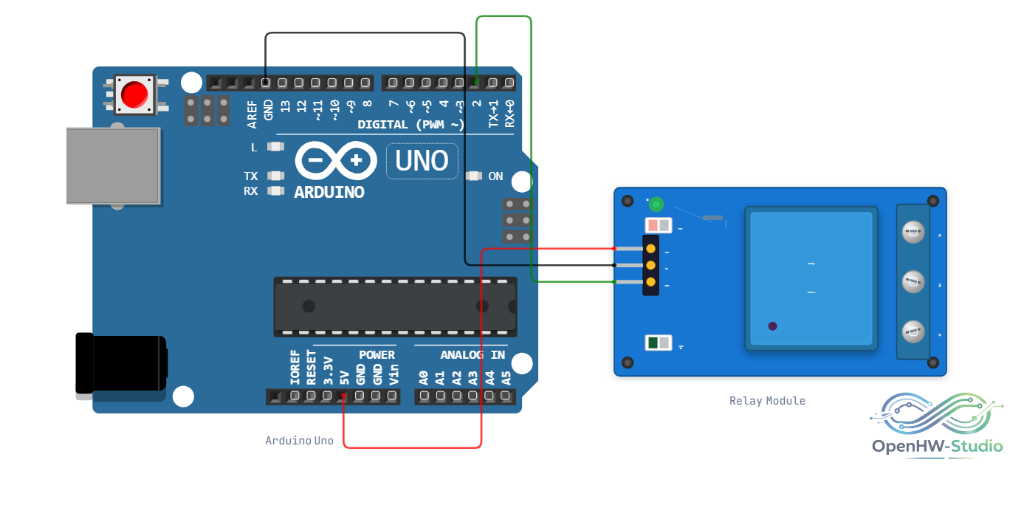
Wiring Diagram
Connect the Relay Module to the Arduino to control high-power loads safely.
Example Arduino Code
This code assumes an Active-LOW relay module.
cpp
const int relayPin = 7;

void setup() {
  pinMode(relayPin, OUTPUT);
  // Active LOW: HIGH = relay OFF (safe default on startup)
  digitalWrite(relayPin, HIGH);
}

void loop() {
  // Turn Relay ON
  digitalWrite(relayPin, LOW);
  delay(2000);

  // Turn Relay OFF
  digitalWrite(relayPin, HIGH);
  delay(2000);
}
Simulation Notes
- In OpenHW Studio, right-click the relay during simulation to toggle between Active LOW and Active HIGH trigger modes dynamically.