
Raindrop Module
A sensor that detects water droplets and outputs both analog and digital signals.
Component Preview
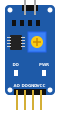 LM393 Module
The Raindrop sensor consists of two parts: a large exposed pad that catches water droplets, and a control module powered by an LM393 comparator. When water touches the pad, it lowers the resistance between its interlaced tracks. The module offers an Analog Output (AO) representing the moisture level, and a Digital Output (DO) that triggers when a specific threshold is reached.
Overview
This module is frequently used in smart weather stations or automatic window closers. The blue trimpot allows you to manually adjust the threshold for the Digital Output (DO). In real life, the DO pin goes LOW when water is detected and HIGH when dry.
Pin Reference
| Pin | Type | Description |
|---|---|---|
| AO | analog | Analog output. Voltage decreases as more water is detected. |
| DO | digital | Digital output. Goes LOW (0V) when the rain level exceeds the threshold. |
| GND | power | Ground connection. Connect to Arduino GND. |
| VCC | power | Power input. Connect to Arduino 5V. |
Configurable Attributes
| Attribute | Type | Default | Description |
|---|---|---|---|
| threshold | number | 300 | The internal comparator threshold (0-1023) to trigger the DO pin. |
Wiring Diagram (Arduino Uno)
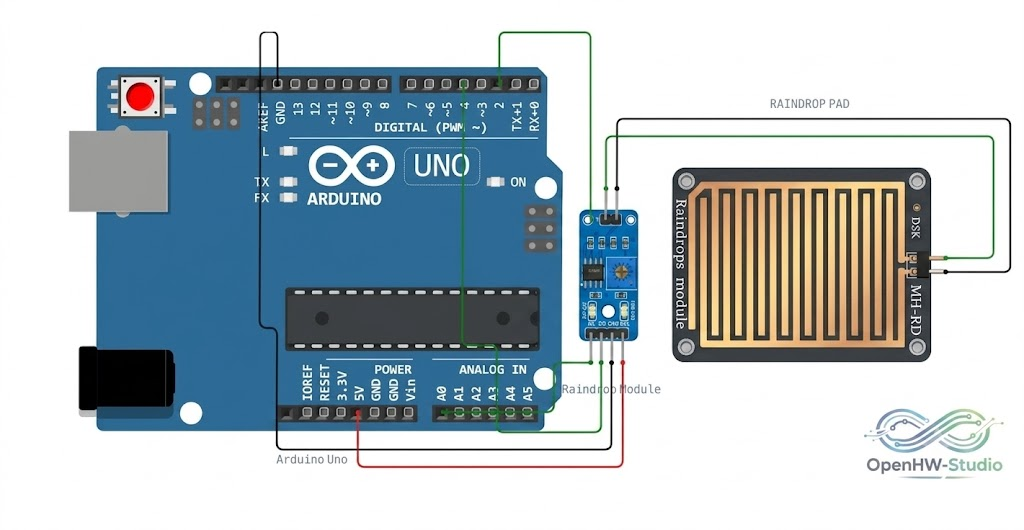
- Connect VCC to Arduino 5V.
- Connect GND to Arduino GND.
- Connect AO to Arduino A0 (to measure the rain level).
- Connect DO to Arduino D2 (to trigger an interrupt or digital read).
- Ensure the Raindrop Pad is connected to the top pins of the module.
Example Arduino Code
This sketch reads the analog rain level and checks the digital threshold pin to trigger a simple alert.
const int analogPin = A0;   // AO pin
const int digitalPin = 2;   // DO pin

void setup() {
  pinMode(digitalPin, INPUT);
  Serial.begin(9600);
}

void loop() {
  int analogValue = analogRead(analogPin);
  int digitalValue = digitalRead(digitalPin);

  Serial.print("Analog Rain Level: ");
  Serial.print(analogValue);

  // Remember: DO is active LOW
  if (digitalValue == LOW) {
    Serial.println(" --> 🌧️ Rain detected!");
  } else {
    Serial.println(" --> ☀️ Dry");
  }

  delay(500);
}
Simulation Notes
- The simulator provides an interactive UI panel for the module. Click on it to adjust the simulated
rainLevelusing the slider. - As the rain level crosses your configured
threshold, the DO LED will turn bright blue, and the DO pin will immediately drop to0V(LOW). - You can right-click the module to set the
thresholdvia the context menu.