
2.9" e-Paper Display
A high-contrast, ultra-low power electrophoretic display module that retains its image even when power is completely removed.
Component Preview
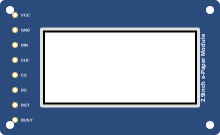 SPI e-Paper
This 2.9-inch E-Ink / e-Paper display is famous for its paper-like readability in direct sunlight and its ability to hold an image indefinitely with zero power. It communicates via SPI.
Overview
Because of its unique physical properties, an e-Paper display does not emit light. Instead, it physically moves microscopic charged pigment particles to the surface. This means refreshing the screen is very slow (often taking a full second or two and flashing black/white to clear ghosting).
Pin Reference
| Pin | Type | Description |
|---|---|---|
| VCC | power | Power supply (3.3V). |
| GND | power | Ground. |
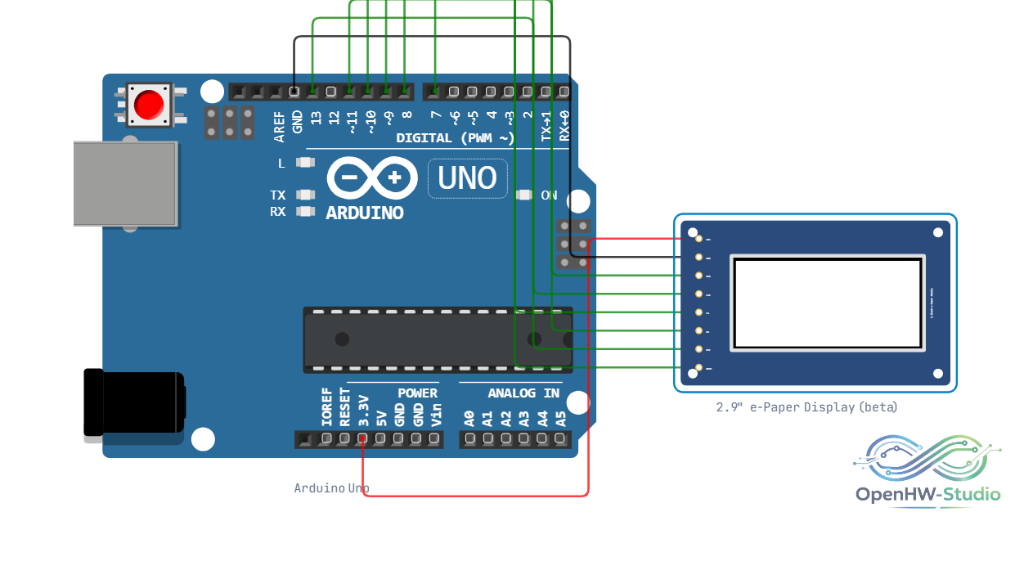
| DIN | digital | SPI MOSI (Data In). Connect to Arduino D11. |
| CLK | digital | SPI Clock. Connect to Arduino D13. |
| CS | digital | Chip Select. Connect to Arduino D10. |
| DC | digital | Data/Command control. Connect to Arduino D9. |
| RST | digital | Reset pin. Connect to Arduino D8. |
| BUSY | digital | Busy status output. Connect to Arduino D7. |
Configurable Attributes
This component has no configurable attributes.
Working Principle
When an update command is sent over SPI, the display controller drives specific voltages across a grid of tiny microcapsules. Black particles (negatively charged) and white particles (positively charged) move up or down depending on the field. Because the particles are physically suspended in a viscous fluid, they stay exactly where they are left when power is cut.
Wiring Diagram
Connect the e-Paper display to the Arduino via the SPI interface.
Example Arduino Code
Install the GxEPD2 library before running this example.
#include <SPI.h>
#include <GxEPD2_BW.h>

// Define pins
#define EPD_CS 10
#define EPD_DC 9
#define EPD_RST 8
#define EPD_BUSY 7

// Instantiate the display (using a common 2.9" profile)
GxEPD2_BW<GxEPD2_290_T94_V2, GxEPD2_290_T94_V2::HEIGHT> epd(GxEPD2_290_T94_V2(EPD_CS, EPD_DC, EPD_RST, EPD_BUSY));

void setup() {
  Serial.begin(9600);
  epd.init(115200);

  // Clear the screen
  epd.setFullWindow();
  epd.fillScreen(GxEPD_WHITE);

  // Draw text
  epd.setTextSize(2);
  epd.setTextColor(GxEPD_BLACK);
  epd.setCursor(20, 40);
  epd.println("Hello World!");

  // Push the buffer to the physical screen (this takes a moment)
  epd.display();
}

void loop() {
  // e-Paper doesn't need to be constantly refreshed!
  delay(10000);
}
Simulation Notes
- The simulator mimics the slow visual update process of an e-Paper display, including the characteristic screen flashing that occurs during a full refresh cycle.
- In the simulator, the display acts as a true SPI device.