
LCD 20x4 (Parallel)
A spacious 20-column by 4-row alphanumeric display utilizing the classic Hitachi HD44780 parallel interface.
Component Preview
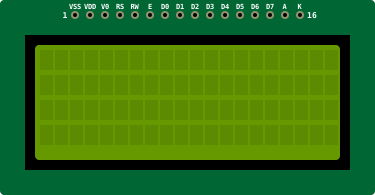 20x4 LCD
A classic alphanumeric liquid crystal display based on the HD44780 controller. It can display 20 characters per line across 4 lines. This version uses a parallel interface requiring at least 6 digital pins.
DisplaysParallelText
Overview
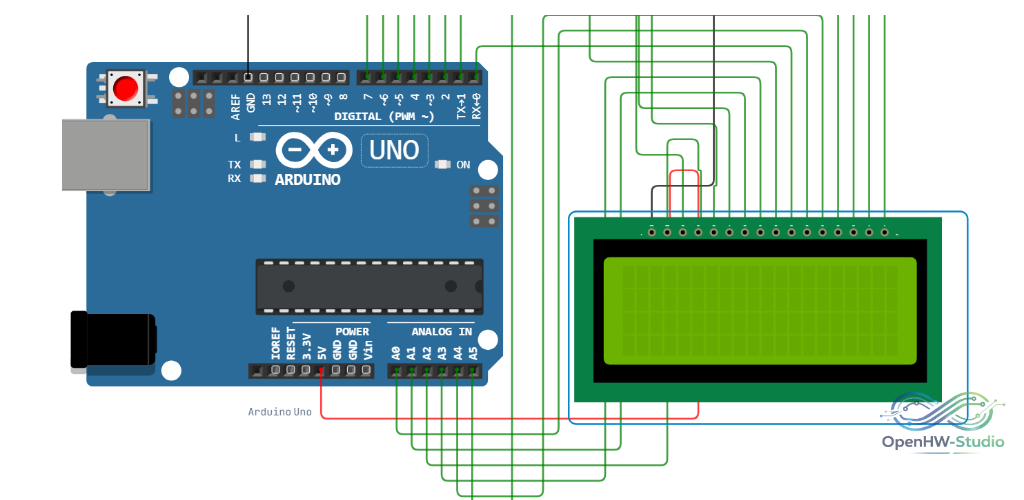
Because this module doesn't use an I2C backpack, you must wire 6 digital lines (in 4-bit mode) directly to the Arduino, plus power and contrast lines. It offers more screen real estate (80 chars total) than the 16x2 version but uses the same underlying HD44780 controller commands.
Pin Reference
| Pin | Type | Description |
|---|---|---|
| VSS | power | Ground (GND). |
| VDD | power | Power (5V). |
| V0 | analog | Contrast Adjustment. Usually connected to a potentiometer. |
| RS | digital | Register Select (0 = Instruction, 1 = Data). |
| RW | digital | Read/Write. Tie to GND for Write-only. |
| E | digital | Enable signal. |
| D0-D3 | digital | Lower data pins (not used in standard 4-bit mode). |
| D4-D7 | digital | Higher data pins (used for both 4-bit and 8-bit modes). |
| A | power | Backlight Anode (+5V). |
| K | power | Backlight Cathode (GND). |
Configurable Attributes
| Attribute | Type | Default | Description |
|---|---|---|---|
| color | string | blue | The backlight color in the simulator (e.g., blue or green). |
Wiring Diagram (4-bit Mode)
Example Arduino Code
This uses the standard Arduino LiquidCrystal library built into the IDE. Notice the lcd.begin(20, 4) initialization.
cpp
#include <LiquidCrystal.h>

// Initialize the library with the numbers of the interface pins
// LiquidCrystal(rs, enable, d4, d5, d6, d7)
LiquidCrystal lcd(12, 11, 5, 4, 3, 2);

void setup() {
  // Set up the LCD's number of columns and rows (20x4):
  lcd.begin(20, 4);

  lcd.setCursor(0, 0);
  lcd.print("OpenHW Studio!");

  lcd.setCursor(0, 1);
  lcd.print("20x4 LCD Display");
}

void loop() {
  lcd.setCursor(0, 2);
  lcd.print("Timer: ");
  lcd.print(millis() / 1000);

  lcd.setCursor(0, 3);
  lcd.print("Running smoothly...");
}
Simulation Notes
- The simulator automatically assumes max contrast if
V0is wired directly to ground. - You can leave
D0-D3completely disconnected in the simulator when using 4-bit mode.