
LCD 16x2 (Parallel)
Standard 16-character by 2-line alphanumeric display utilizing the classic Hitachi HD44780 parallel interface.
Component Preview
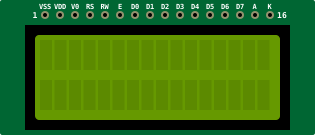 16x2 LCD
A classic alphanumeric liquid crystal display based on the HD44780 controller. It can display 16 characters per line across 2 lines. This version uses a parallel interface requiring at least 6 digital pins.
DisplaysParallelText
Overview
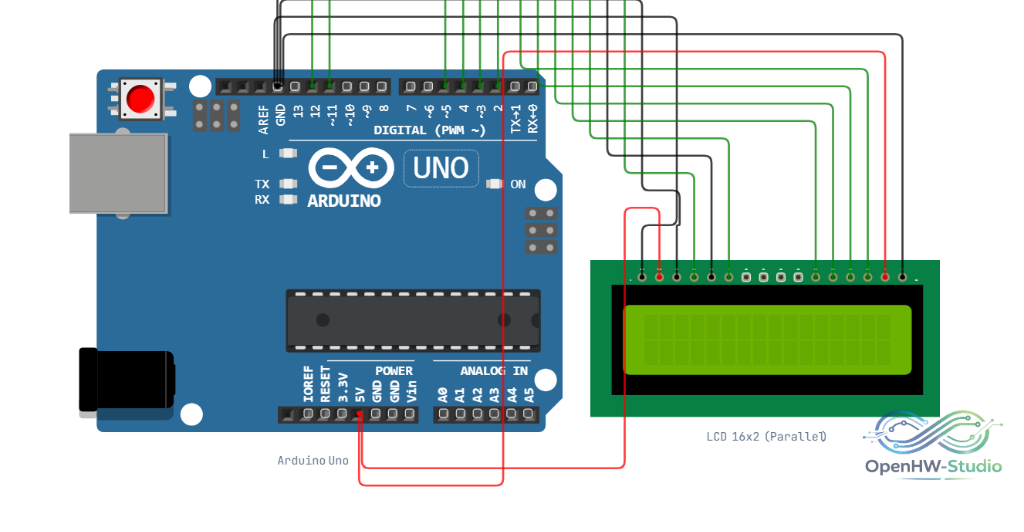
The LCD 16x2 is one of the most common display modules for microcontrollers. Because it doesn't use an I2C backpack, you must wire 6 digital lines (in 4-bit mode) directly to the Arduino, plus power and contrast lines.
Pin Reference
| Pin | Type | Description |
|---|---|---|
| VSS | power | Ground (GND). |
| VDD | power | Power (5V). |
| V0 | analog | Contrast Adjustment. Usually connected to a potentiometer. |
| RS | digital | Register Select (0 = Instruction, 1 = Data). |
| RW | digital | Read/Write. Tie to GND for Write-only. |
| E | digital | Enable signal. |
| D0-D3 | digital | Lower data pins (not used in standard 4-bit mode). |
| D4-D7 | digital | Higher data pins (used for both 4-bit and 8-bit modes). |
| A | power | Backlight Anode (+5V). |
| K | power | Backlight Cathode (GND). |
Configurable Attributes
| Attribute | Type | Default | Description |
|---|---|---|---|
| color | string | blue | The backlight color in the simulator (e.g., blue or green). |
Wiring Diagram (4-bit Mode)
Example Arduino Code
This uses the standard Arduino LiquidCrystal library built into the IDE.
cpp
#include <LiquidCrystal.h>

// Initialize the library with the numbers of the interface pins
// LiquidCrystal(rs, enable, d4, d5, d6, d7)
LiquidCrystal lcd(12, 11, 5, 4, 3, 2);

void setup() {
  // Set up the LCD's number of columns and rows:
  lcd.begin(16, 2);

  // Print a message to the LCD.
  lcd.print("Hello World!");
}

void loop() {
  // Set the cursor to column 0, line 1
  // (note: line 1 is the second row, since counting begins with 0):
  lcd.setCursor(0, 1);

  // Print the number of seconds since reset:
  lcd.print(millis() / 1000);
}
Simulation Notes
- The simulator automatically assumes max contrast if
V0is wired directly to ground. - You can leave
D0-D3completely disconnected in the simulator when using 4-bit mode.