
MAX98357 I2S Amp
A digital-to-analog converter (DAC) and class D amplifier combined into one module, using the I2S digital audio standard.
Component Preview
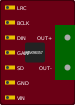 MAX98357A
Unlike simple buzzers or analog amplifiers, the MAX98357A accepts a pure digital I2S audio stream. It converts this digital stream internally to analog and amplifies it to drive a 4Ω to 8Ω speaker directly, providing much cleaner audio than PWM-based approaches.
Overview
I2S (Inter-IC Sound) is a standardized serial bus used for connecting digital audio devices. It is completely different from I2C. The ESP32 and other advanced microcontrollers have dedicated I2S hardware peripherals that can stream high-quality audio files directly to this module.
Pin Reference
| Pin | Type | Description |
|---|---|---|
| LRC | input | Left/Right Clock (Word Select). Tells the DAC whether the current data is for the left or right channel. |
| BCLK | input | Bit Clock. The clock signal that synchronizes the data bits. |
| DIN | input | Data In. The actual digital audio data stream. |
| GAIN | analog | Gain Select. Leaves floating for 9dB gain. Connect to GND for 12dB. |
| SD | input | Shutdown / Channel Select. Used to configure mono mixing or shut down the amp. |
| GND | power | Ground. |
| VIN | power | Power Supply (2.5V - 5.5V). Connect to 3.3V or 5V. |
| OUT+ | output | Positive terminal for speaker connection. |
| OUT- | output | Negative terminal for speaker connection. |
Configurable Attributes
This component has no standard configurable attributes.
Wiring Diagram (ESP32 Example)
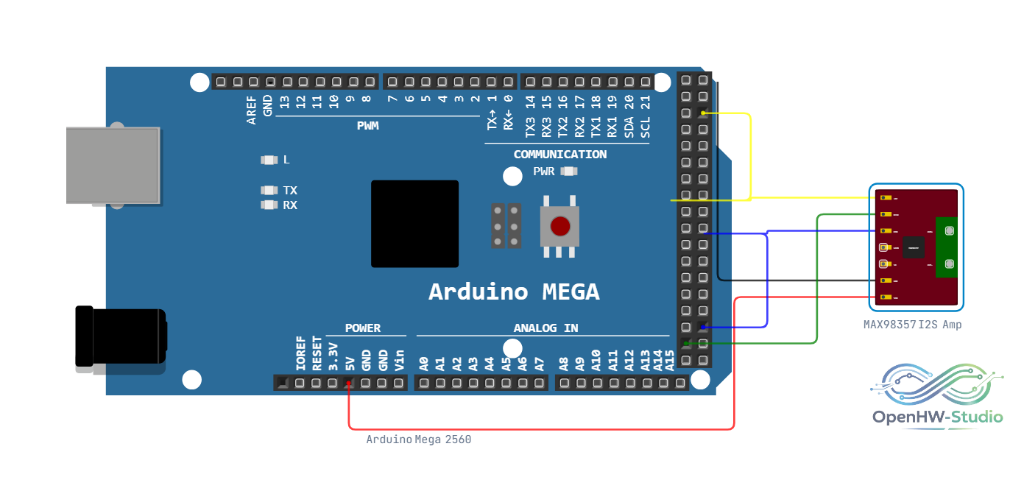
- Connect VIN to ESP32 5V (or 3.3V).
- Connect GND to ESP32 GND.
- Connect LRC to ESP32 GPIO 25.
- Connect BCLK to ESP32 GPIO 26.
- Connect DIN to ESP32 GPIO 22.
- Connect OUT+ and OUT- to a speaker.
Example Arduino Code (ESP32)
This example uses the ESP32's built-in I2S driver to stream a basic sine wave or read from an SD card.
#include <driver/i2s.h>

// I2S Pins
#define I2S_BCLK 26
#define I2S_LRC  25
#define I2S_DOUT 22

void setup() {
  Serial.begin(115200);

  // Configure I2S peripheral
  i2s_config_t i2s_config = {
    .mode = (i2s_mode_t)(I2S_MODE_MASTER | I2S_MODE_TX),
    .sample_rate = 44100,
    .bits_per_sample = I2S_BITS_PER_SAMPLE_16BIT,
    .channel_format = I2S_CHANNEL_FMT_ONLY_LEFT,
    .communication_format = I2S_COMM_FORMAT_STAND_I2S,
    .intr_alloc_flags = ESP_INTR_FLAG_LEVEL1,
    .dma_buf_count = 8,
    .dma_buf_len = 64,
    .use_apll = false
  };

  i2s_pin_config_t pin_config = {
    .bck_io_num = I2S_BCLK,
    .ws_io_num = I2S_LRC,
    .data_out_num = I2S_DOUT,
    .data_in_num = I2S_PIN_NO_CHANGE
  };

  i2s_driver_install(I2S_NUM_0, &i2s_config, 0, NULL);
  i2s_set_pin(I2S_NUM_0, &pin_config);
  i2s_set_clk(I2S_NUM_0, 44100, I2S_BITS_PER_SAMPLE_16BIT, I2S_CHANNEL_MONO);
}

void loop() {
  // Generate a simple square wave tone manually for demonstration
  int16_t sample = 10000;
  size_t bytes_written;

  for (int i = 0; i < 50; i++) {
    i2s_write(I2S_NUM_0, &sample, sizeof(sample), &bytes_written, portMAX_DELAY);
  }

  sample = -10000;
  for (int i = 0; i < 50; i++) {
    i2s_write(I2S_NUM_0, &sample, sizeof(sample), &bytes_written, portMAX_DELAY);
  }
}
Simulation Notes
- Audio playback inside the simulator depends on your browser's audio policies. You may need to interact with the canvas (click a button) before sound is allowed to play.
- Performance varies based on how demanding the I2S decoding is; ESP32 is generally required for smooth audio emulation.