
DHT22 Temperature & Humidity Sensor
A highly popular, low-cost digital temperature and humidity sensor using a custom single-wire protocol.
Component Preview
 DHT22 Sensor
The DHT22 provides reliable temperature and humidity readings over a single digital line. While slower than modern I2C sensors (max 0.5 Hz sampling rate), it is extremely easy to wire and widely supported by community libraries.
Overview
Inside the slotted plastic casing are a capacitive humidity sensor, an NTC thermistor for temperature, and a small 8-bit microcontroller that converts the analog readings into a precise 40-bit digital pulse train.
Pin Reference
| Pin | Type | Description |
|---|---|---|
| VCC (1) | power | Power supply. Connect to 5V or 3.3V. |
| SDA (2) | digital | Data signal. Connect to any digital pin. Requires a pull-up resistor in hardware (emulated internally in OpenHW Studio). |
| NC (3) | passive | Not Connected. Do not wire. |
| GND (4) | power | Common ground connection. |
Configurable Attributes
| Attribute | Type | Default | Description |
|---|---|---|---|
| temperature | number | 24.0 | Temperature in °C (-40 to 80). Adjustable live. |
| humidity | number | 50.0 | Relative humidity in % (0 to 100). Adjustable live. |
Working Principle
Polling Frequency
The DHT22 is a slow sensor. You must wait at least 2 seconds between sequential reads (e.g., delay(2000);). Polling the sensor more frequently than 0.5Hz will cause the read functions to return NaN (Not a Number) or fail silently.
Wiring Diagram
- Connect VCC to 5V.
- Connect GND to Ground.
- Connect SDA to a digital pin (e.g., D2).
- Ignore the NC pin entirely.
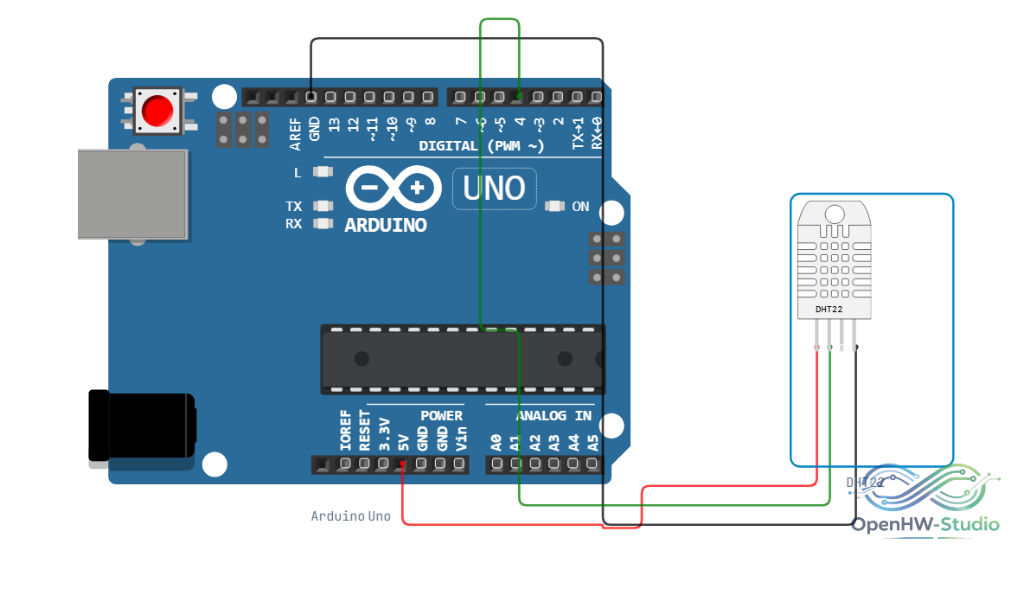
Example Arduino Code
Install the DHT sensor library by Adafruit via the OpenHW Library Manager.
#include "DHT.h"

// Define the pin and type
#define DHTPIN 2
#define DHTTYPE DHT22

// Initialize DHT sensor module
DHT dht(DHTPIN, DHTTYPE);

void setup() {
  Serial.begin(9600);
  Serial.println(F("DHT22 Starting..."));
  dht.begin();
}

void loop() {
  // Wait 2 seconds between measurements
  delay(2000);

  float h = dht.readHumidity();
  float t = dht.readTemperature();

  if (isnan(h) || isnan(t)) {
    Serial.println(F("Failed to read from DHT sensor!"));
    return;
  }

  Serial.print(F("Humidity: "));
  Serial.print(h);
  Serial.print(F("%  Temperature: "));
  Serial.print(t);
  Serial.println(F(" °C"));
}
Simulation Notes
- In real hardware, the DATA pin requires a 10kΩ pull-up resistor connected to VCC. The simulator mathematically emulates this pull-up resistor, meaning you do not need to add one to the virtual canvas.
- Right-click the component to manually sweep the temperature and humidity values live during simulation.