
Nokia 5110 Screen
A classic 84x48 pixel monochrome LCD screen, originally used in the iconic Nokia 5110 mobile phone.
Component Preview
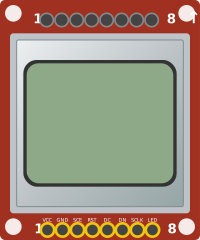 Nokia 5110
The Nokia 5110 is a basic graphic LCD screen for lots of applications. It uses the PCD8544 controller, which is the same one used in the Nokia 3310 LCD. The PCD8544 is a low power CMOS LCD controller/driver, designed to drive a graphic display of 48 rows and 84 columns.
Overview
This display is inexpensive, easy to use, requires only a few digital I/O pins, and consumes very little power. It interfaces to microcontrollers through a serial SPI-like protocol.
WARNING
Voltage Limits: The physical Nokia 5110 is typically a 3.3V device. Supplying 5V to the VCC or logic pins on real hardware might damage it. (The simulator tolerates 5V logic for convenience, but you should still wire VCC to 3.3V).
Pin Reference
| Pin | Type | Description |
|---|---|---|
| VCC | power | Power Supply (3.3V). |
| GND | power | Ground. Connect to Arduino GND. |
| SCE | digital | Chip Enable (Active Low). |
| RST | digital | Reset. |
| DC | digital | Data / Command selection. |
| DN | digital | Data In (MOSI). |
| SCLK | digital | Serial Clock. |
| LED | power | Backlight Power (3.3V). |
Wiring Diagram
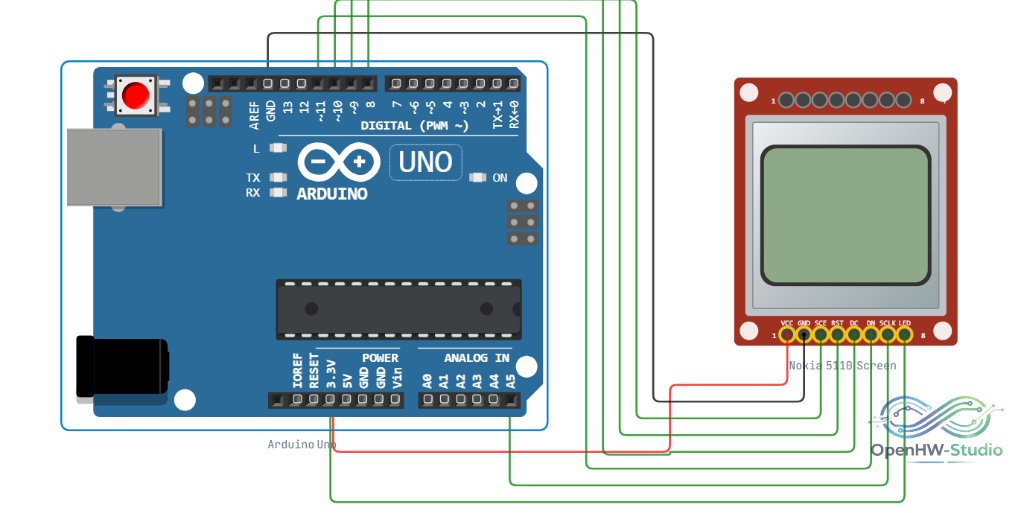
- Connect VCC and LED to 3.3V.
- Connect GND to GND.
- Connect SCE to Arduino D7.
- Connect RST to Arduino D6.
- Connect DC to Arduino D5.
- Connect DN (MOSI) to Arduino D11.
- Connect SCLK to Arduino D13.
Example Arduino Code
You can use the Adafruit PCD8544 and Adafruit GFX libraries to easily draw text and shapes on this screen.
#include <SPI.h>
#include <Adafruit_GFX.h>
#include <Adafruit_PCD8544.h>

// Software SPI (slower updates, more flexible pinout):
// pin 13 - Serial clock out (SCLK)
// pin 11 - Serial data out (DIN)
// pin 5 - Data/Command select (D/C)
// pin 7 - LCD chip select (CS)
// pin 6 - LCD reset (RST)
Adafruit_PCD8544 display = Adafruit_PCD8544(13, 11, 5, 7, 6);

void setup() {
  display.begin();

  // You can change the contrast around to adapt the display
  // for the best viewing!
  display.setContrast(50);

  display.clearDisplay();

  display.setTextSize(1);
  display.setTextColor(BLACK);
  display.setCursor(0,0);
  display.println("OpenHW Studio!");
  display.display();
}

void loop() {
  // Main code
}