
MFRC522 RFID Reader
A popular SPI-based module for reading and writing 13.56MHz contactless smart cards and tags.
Component Preview
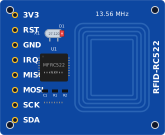 RC522
RC522The MFRC522 communicates over SPI and reads the unique UID from Mifare Classic RFID cards and key fobs. Each card has a different UID that your sketch can use to grant or deny access. In OpenHW Studio, right-click the component during simulation to configure card presence and edit the UID.
Overview
Radio Frequency Identification (RFID) uses electromagnetic fields to automatically identify and track tags attached to objects. The MFRC522 operates at 13.56 MHz.
CAUTION
Voltage Warning: The MFRC522 requires 3.3V power. Connecting its VCC pin to 5V will permanently damage the chip! (The logic pins are generally 5V tolerant, but the power pin is not).
Pin Reference
| Pin | Type | Description |
|---|---|---|
| 3V3 | power | Power Supply (3.3V ONLY). |
| RST | digital | Reset Pin. Connect to Arduino D9. |
| GND | power | Ground. Connect to Arduino GND. |
| IRQ | digital | Interrupt Request. Usually left unconnected. |
| MISO | digital | SPI Master In Slave Out. Connect to Arduino D12. |
| MOSI | digital | SPI Master Out Slave In. Connect to Arduino D11. |
| SCK | digital | SPI Clock. Connect to Arduino D13. |
| SDA | digital | SPI Chip Select (SS). Connect to Arduino D10. |
Configurable Attributes
| Attribute | Type | Default | Description |
|---|---|---|---|
| cardUID | string | DE AD BE EF | The UID returned when a card is presented. Format as space-separated hex bytes. |
| cardPresent | boolean | false | Toggle card presence during simulation. You can also do this via the right-click menu. |
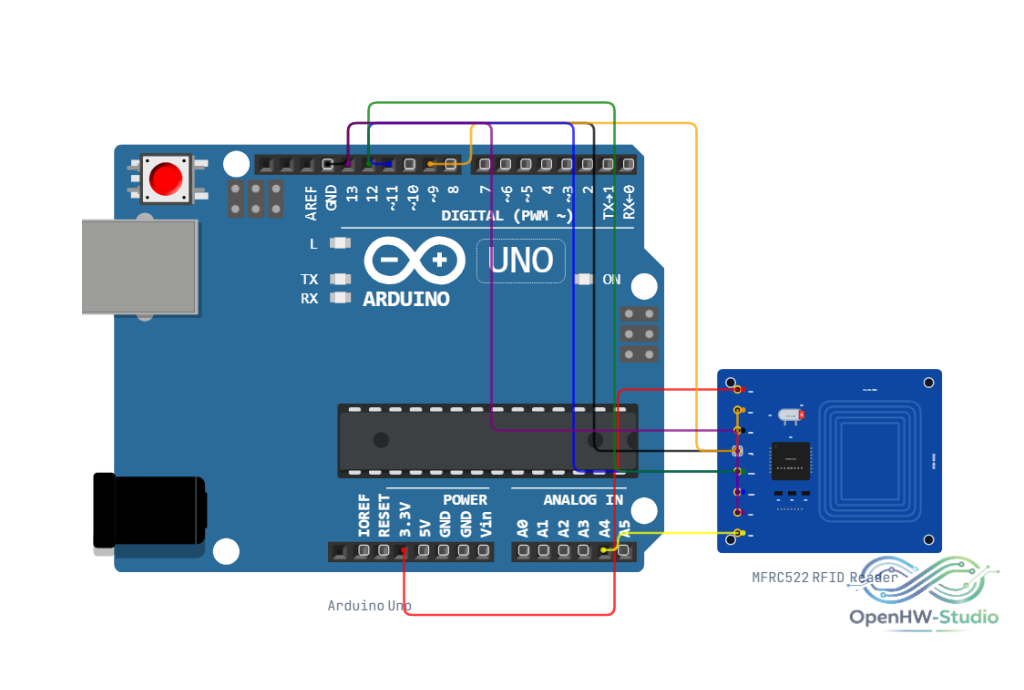
Wiring Diagram (Arduino Uno)
- Connect 3V3 to Arduino 3.3V (NOT 5V).
- Connect GND to Arduino GND.
- Connect RST to Arduino D9.
- Connect SDA to Arduino D10.
- Connect MOSI to Arduino D11.
- Connect MISO to Arduino D12.
- Connect SCK to Arduino D13.
Example Arduino Code
Install the MFRC522 library by GithubCommunity before running this code.
#include <SPI.h>
#include <MFRC522.h>

#define RST_PIN  9
#define SS_PIN   10

MFRC522 rfid(SS_PIN, RST_PIN);

void setup() {
  Serial.begin(9600);
  SPI.begin();

  // Initialize the MFRC522 module
  rfid.PCD_Init();

  Serial.println("Hold card near reader...");
}

void loop() {
  // Look for new cards
  if (!rfid.PICC_IsNewCardPresent()) {
    return;
  }

  // Select one of the cards
  if (!rfid.PICC_ReadCardSerial()) {
    return;
  }

  // Print the UID
  Serial.print("UID:");
  for (byte i = 0; i < rfid.uid.size; i++) {
    Serial.print(rfid.uid.uidByte[i] < 0x10 ? " 0" : " ");
    Serial.print(rfid.uid.uidByte[i], HEX);
  }
  Serial.println();

  // Halt PICC to stop reading the same card repeatedly
  rfid.PICC_HaltA();
}
Simulation Notes
- In OpenHW Studio, right-click the component during simulation to configure card presence and edit the UID. A glowing ripple animation on the module indicates when a card is actively being detected.